I Lost a War With a Grocery Bot and Built a Better Dinner Planner Anyway
Every family has the same 5 p.m. conversation: "What's for dinner?" and nobody has an answer. I've spent years trying to solve this with technology, but the information is always scattered between recipes, the family calendar, and whatever happens to be rotting in the back of the fridge. My previous attempt was a brittle automation that eventually collapsed under its own weight, leaving me right back where I started—staring at a half-empty pantry and reaching for the takeout menu.
The 5 p.m. Conversation Nobody Wants to Have
Decision fatigue isn't just a buzzword; it's the physical weight of having to synthesize four different streams of data while your kids are asking for snacks. To answer the dinner question, I used to have to check the recipes in my manager, look at the family Google Calendar to see who has soccer practice, and try to remember if that chicken in the fridge is still safe to eat. When that information is scattered, you don't make a choice. You just give up and order takeout.
I tried to solve this once before with a complex n8n workflow. It was a classic case of over-engineering a solution that was too brittle to survive real life. If one API response changed or a single node in the automation timed out, the whole thing collapsed. I spent more time debugging the workflow than actually planning meals. It half-solved the problem, but it was impossible to evolve. I needed something that didn't just automate the mess, but actually understood the constraints of my household.
Why the Old System Failed
- Scattered data across multiple disconnected nodes
- Constant maintenance when APIs updated
- Hard to adjust for daily schedule changes
- No feedback loop for family tastes
- Single source of truth for recipes and calendar
- Deterministic code for math and schedules
- Mobile-first design for kitchen use
- Learning loop based on accepted meals
Design Philosophy: AI Drafts, Humans Decide, Code Executes
When I sat down to build Yossio Meals, I had to decide where the machine's job ended and mine began. Large Language Models are fantastic at creative synthesis—like suggesting a Moroccan-inspired chicken dish because I have half a jar of olives to use up—but they're notoriously bad at logic. If you ask an AI to consolidate a shopping list, it might decide that two half-pounds of chicken and a separate sixteen-ounce package somehow equals three pounds of meat. It isn't lying; it just isn't built for arithmetic.
My rule for this system is simple: AI drafts, humans decide, and code executes. The LLM proposes a meal plan based on my household rules, but it generates that plan as strict, schema-validated JSON. From that point on, deterministic Python takes over. Python handles the math, deduplicates the ingredients, and sums up the quantities. If a recipe calls for two cloves of garlic and another calls for three, I want a piece of code that knows 2+3=5, not a probabilistic model that might hallucinate a bulb of ginger instead.
I also chose to use boring technology on purpose. I didn't want to spend my weekends debugging a complex build step or a bloated Single Page Application. The app is built with Python 3.12, FastAPI, and Jinja2 templates. It uses a little HTMX for partial updates so the page doesn't have to reload every time I drag a meal to a different day, but otherwise, it's just server-rendered HTML. It runs on a box in my house, behind my own authentication, keeping my family's data private and my cloud bill at zero.
The Kitchen-First Design Requirements
The Architecture Under the Hood
I wanted to build a tool that feels like a native app without the headache of a modern JavaScript build pipeline. The backend is Python 3.12 running FastAPI, which handles the heavy lifting of schedule logic and data validation. For the frontend, I skipped the Single Page Application (SPA) route entirely. Instead, I used Jinja2 templates for server-side rendering and HTMX for partial page updates. This means when I drag a meal to a different day or swap a recipe, only that specific part of the DOM refreshes. It's fast, it's responsive, and it doesn't require a single bundler.
For the data layer, I'm using SQLModel over SQLite. The source of truth for the entire system is a ScheduledMeal table. To keep things snappy, I added a Valkey (Redis) instance to handle cached Google Calendar events, background images, and rate-limit counters. This stack runs on my own hardware at home, tucked safely behind a Cloudflare Tunnel and Authentik OIDC for single sign-on. It's a private, self-hosted ecosystem where I'm not paying a monthly subscription for the privilege of knowing what I'm eating on Tuesday.
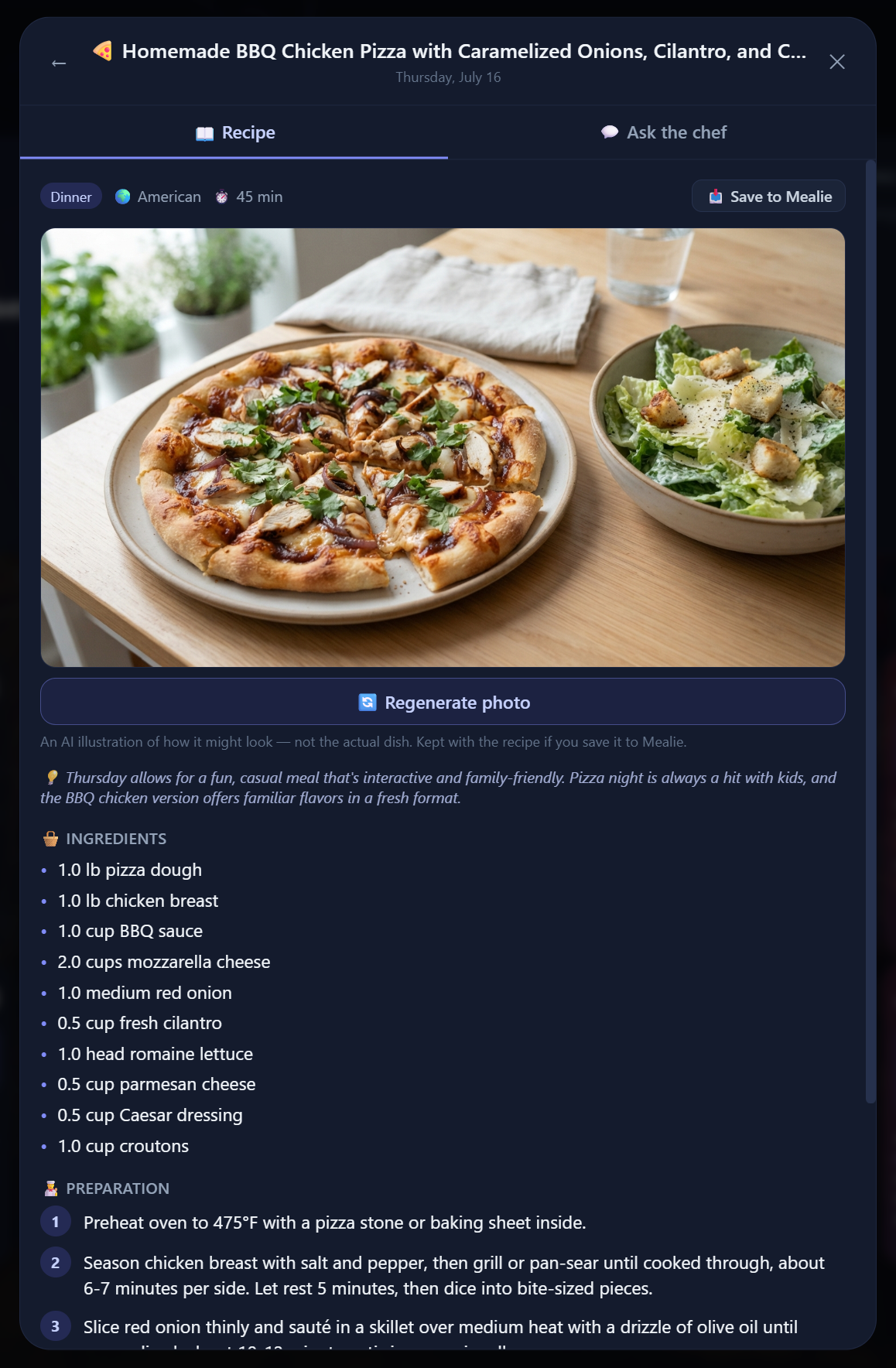
The AI integration is where the creative work happens. I use OpenRouter as a single gateway to access various LLMs. This allows me to swap models for planning or the 'Ask the Chef' chat without rewriting my integration code. For meal photos, I tap into Google's Gemini 'Nano Banana' model via the same gateway. Once a meal is accepted, the system quietly generates a photorealistic image in the background. These photos follow the meal everywhere—from the dashboard thumbnails to the final PDF export.
The Yossio Meals Tech Stack
| Component | Technology | Purpose |
|---|---|---|
| Language & Framework | Python 3.12 + FastAPI | Core logic and async API handling |
| Frontend Interaction | HTMX + Tailwind CSS | Dynamic UI updates without page reloads |
| Recipe Library | Mealie Integration | The 'pantry' for storing and scraping recipes |
| AI Gateway | OpenRouter | Swappable LLMs for planning and image generation |
| Infrastructure | Docker Compose + Cloudflare | Deployment and secure remote access |
| Document Engine | WeasyPrint | Generating polished PDF meal plans with CSS |
The Planning Loop: From Request to Shopping List
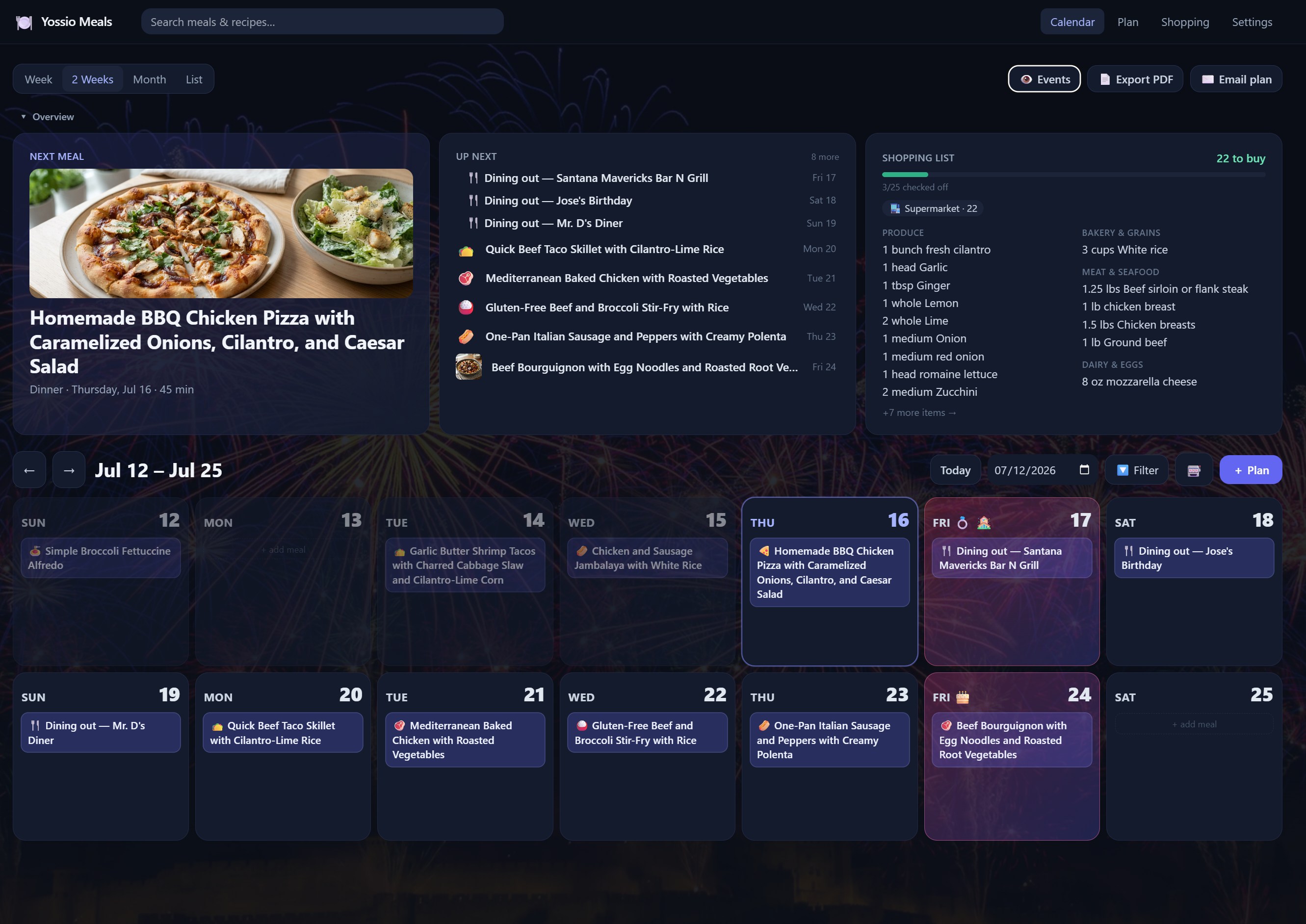
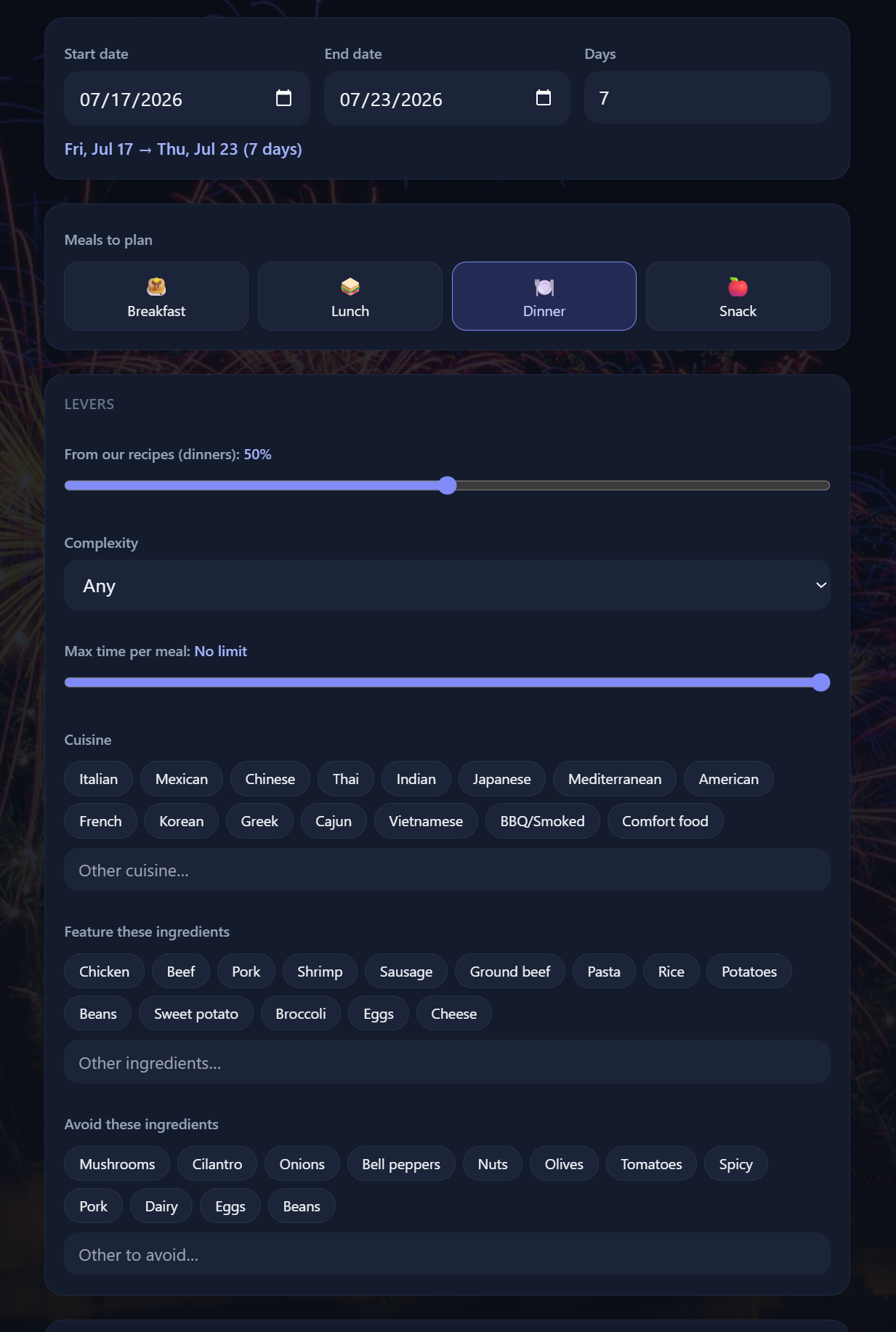
I built this system to handle the heavy lifting of synthesis without giving up the final word. The process starts with a simple natural-language request where I tell the app how many days I’m planning for and what my ambition level looks like for the week. I can specify a time budget for weeknights, mention that I have a jar of olives to use up, or ask for a specific cuisine. The system doesn't just look at my request; it reads my Google Calendar to see which nights are blocked by soccer practice or work dinners so it doesn't suggest a three-hour braise on a night I'm not even home until six.
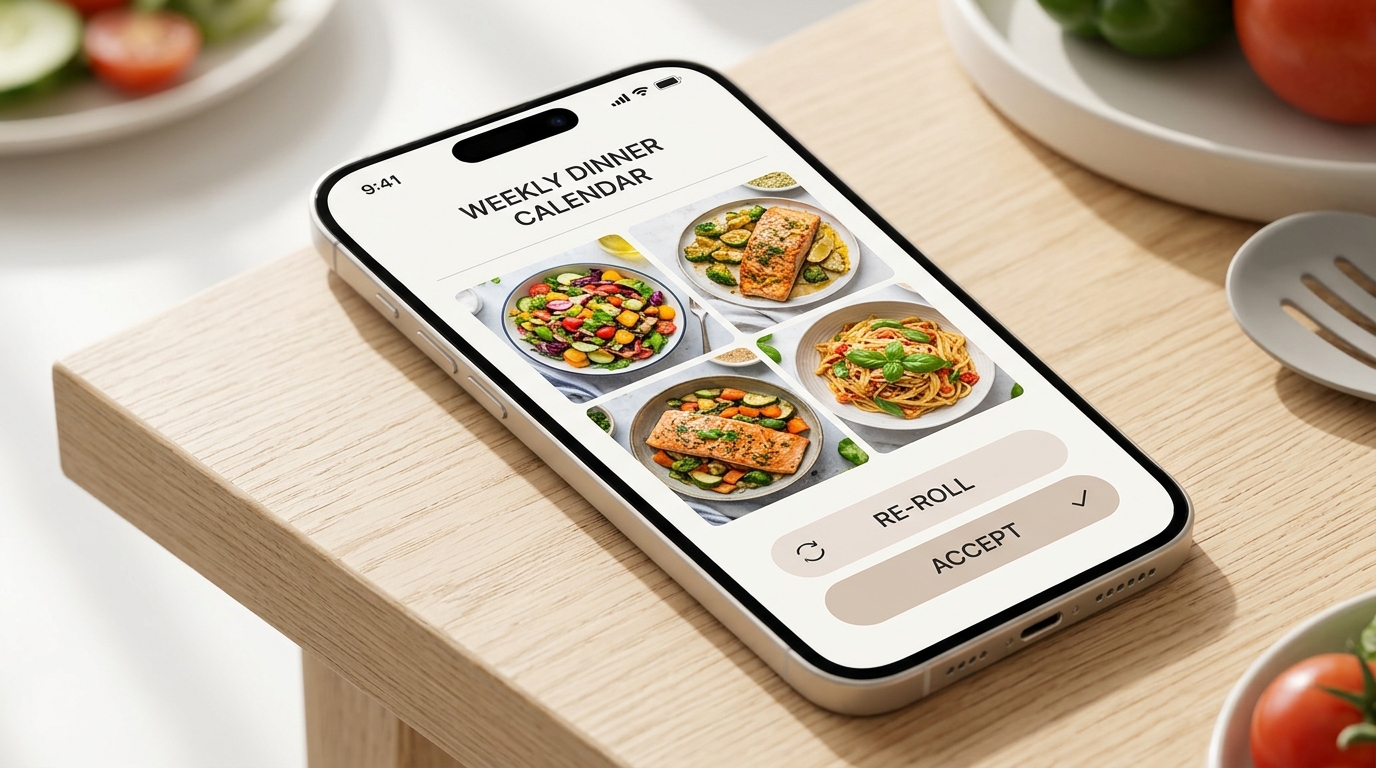
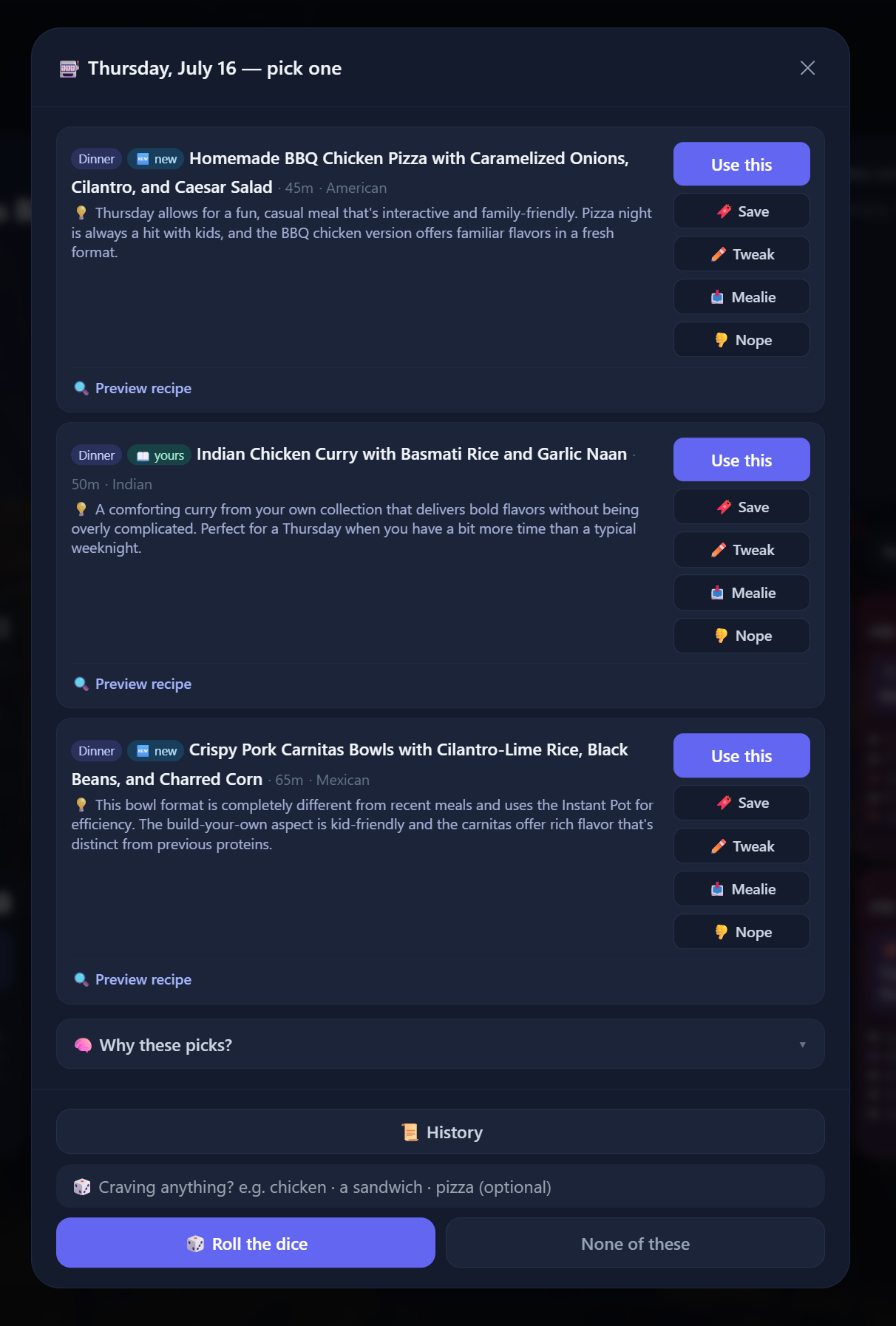
Once I hit go, the LLM generates a draft. I've tuned the prompt to enforce strict household rules: no fish except shrimp, no kale, and no quinoa. It also knows our preferred serving sizes and the difference between weekend and weeknight effort. The model returns this as schema-validated JSON, and if it trips up and sends malformed data, the system is programmed with one automatic repair retry to fix the syntax. I get to review the results before anything is committed. If a specific dish doesn't look right, I can reroll a single meal or replan the whole day until it fits. Only when I click 'Accept' does the code take over to write the events to my calendar and generate the shopping list.
The Four-Step Planning Cycle
- Input
Define the date range, complexity, and any specific ingredients you want to use up or avoid.
- Draft
The AI generates a plan that respects your Google Calendar schedule and household dietary rules.
- Review
You approve the plan, swap out specific meals, or reroll entire days until you're satisfied.
- Execute
Python saves the schedule, deduplicates the shopping list, and writes the final events to your calendar.
Feature Deep-Dive
The Calendar as the Home Screen
The home screen is a rolling two-week grid that overlays my actual Google Calendar. It pulls in soccer practices and work dinners so I don't accidentally plan a complex meal when I'm not even home. I can tap any day to add a meal manually, browse my Mealie library, or generate three AI options on the fly. If I change my mind, I just drag a meal from Tuesday to Thursday. Because I used HTMX, these updates happen instantly without a full page reload.
Aisle-Grouped Shopping Lists
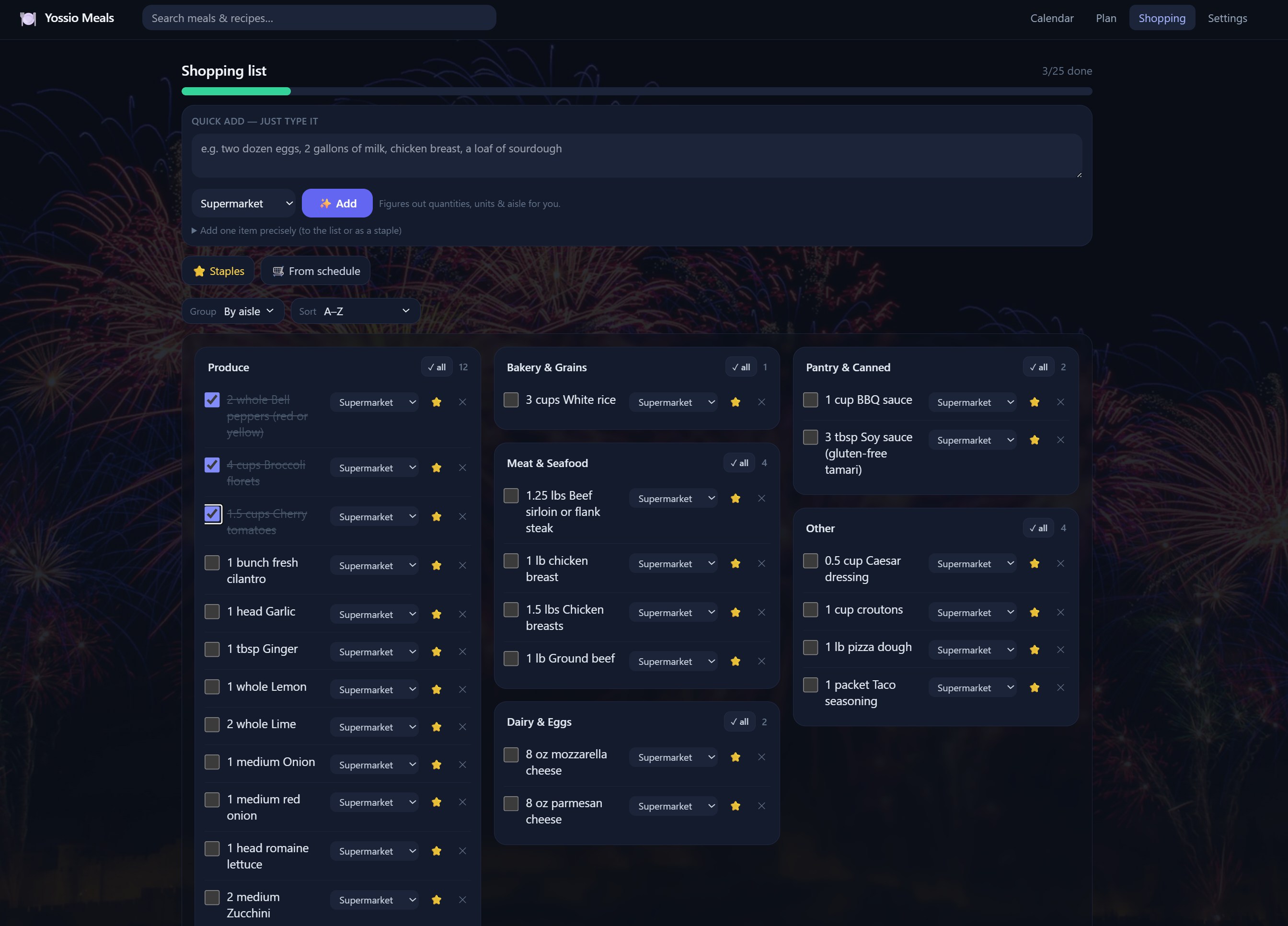
The shopping list isn't just a dump of ingredients. It is a deduplicated, quantity-summed list sorted by the way I actually walk the store—starting at produce and ending at the frozen section. It handles staples and multiple stores, and I can export it as a CSV, plain text, or a PDF. The goal was to stop the 'back-and-forth' through the aisles that happens when your list is just a random pile of notes.
Cook Mode and the 'Ask the Chef' Chat
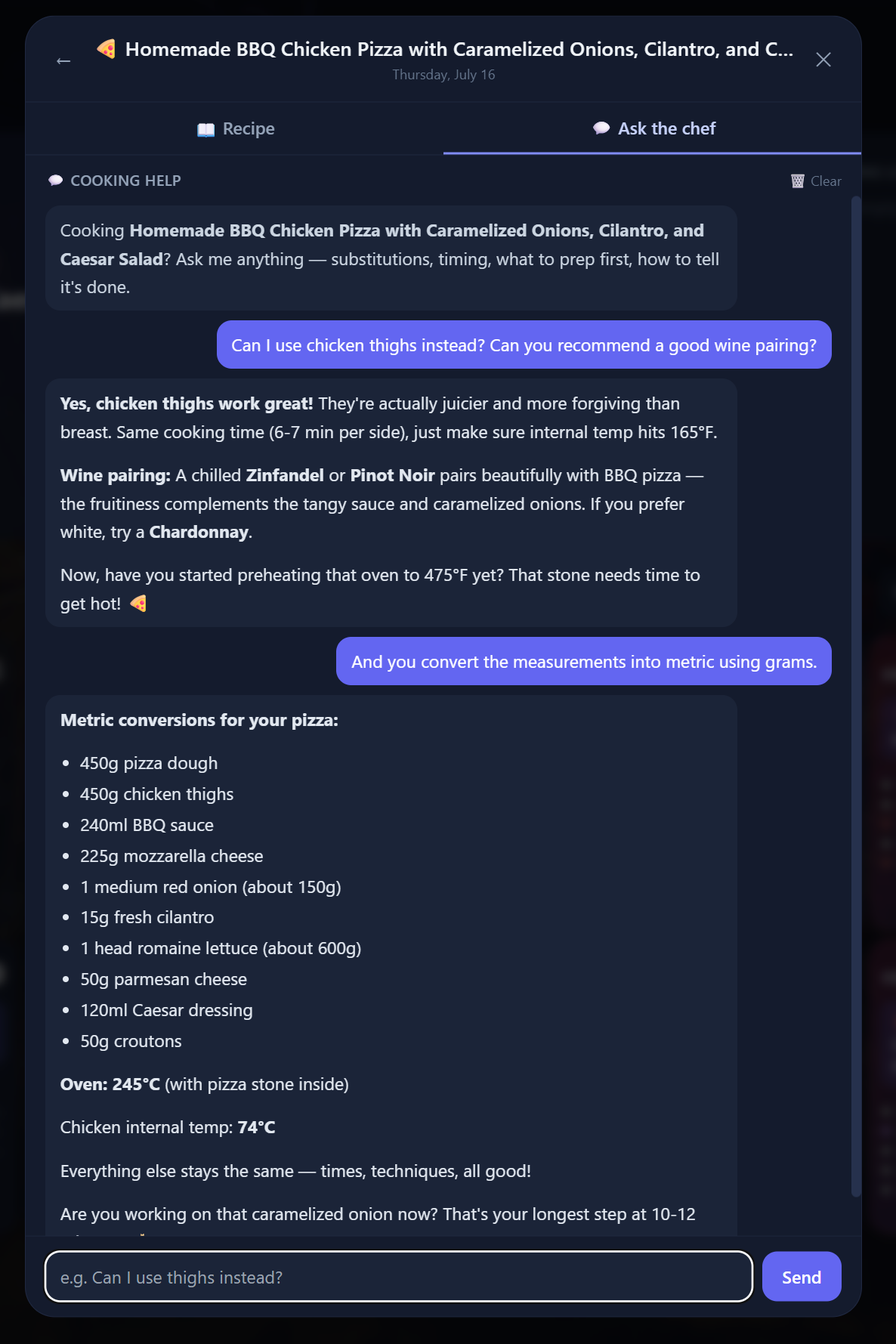
When it is time to start cooking, the app switches to a clean view with ingredients and numbered steps. The real standout is the 'Ask the Chef' feature. I can ask the recipe specific questions like, 'Can I substitute half-and-half?' or 'My shrimp is frozen, do I steam it?' I reworked the mobile UI into two pinned tabs so the chat stays self-contained and the keyboard doesn't jump around while I'm trying to read the next step.
Polished PDF Exports with WeasyPrint
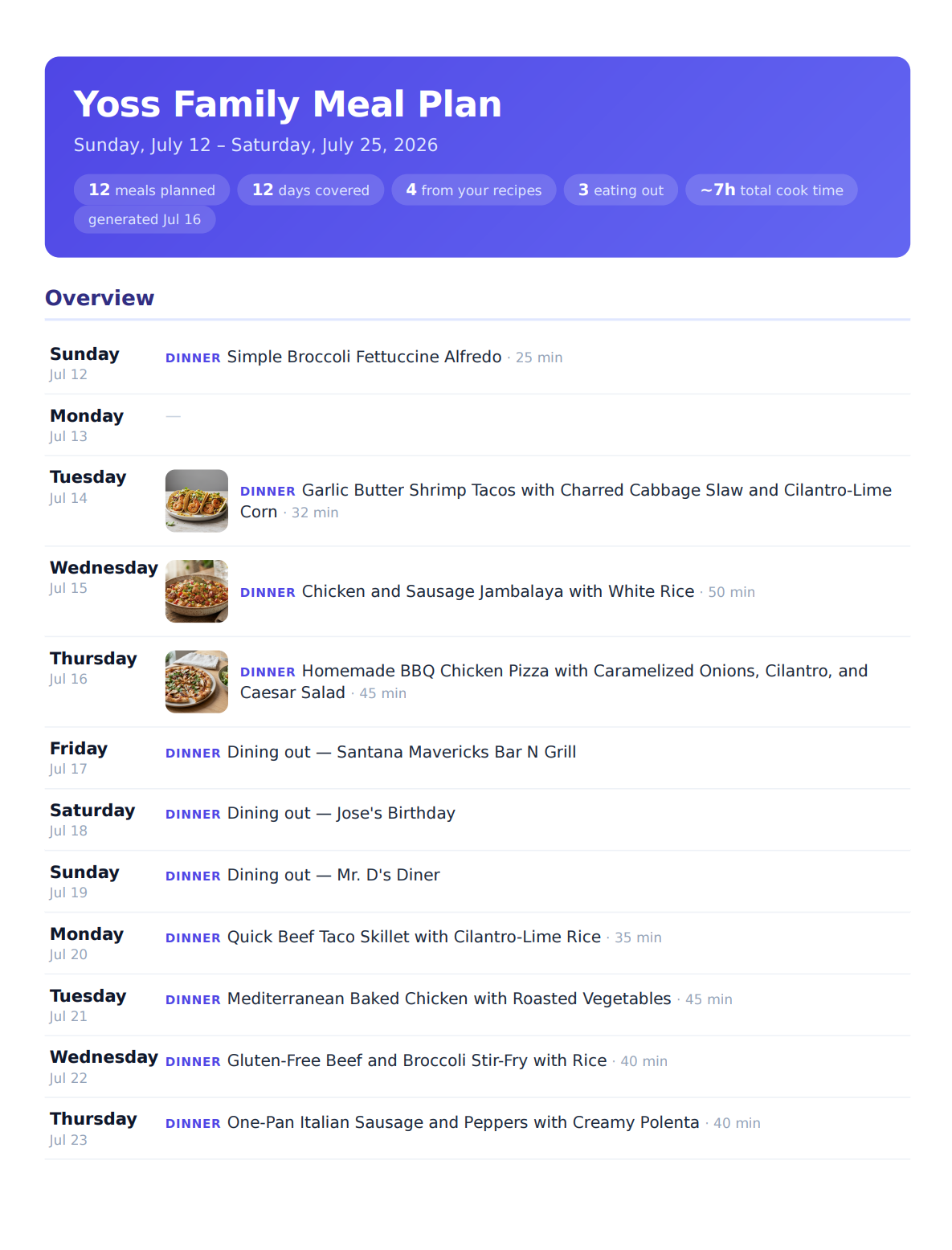
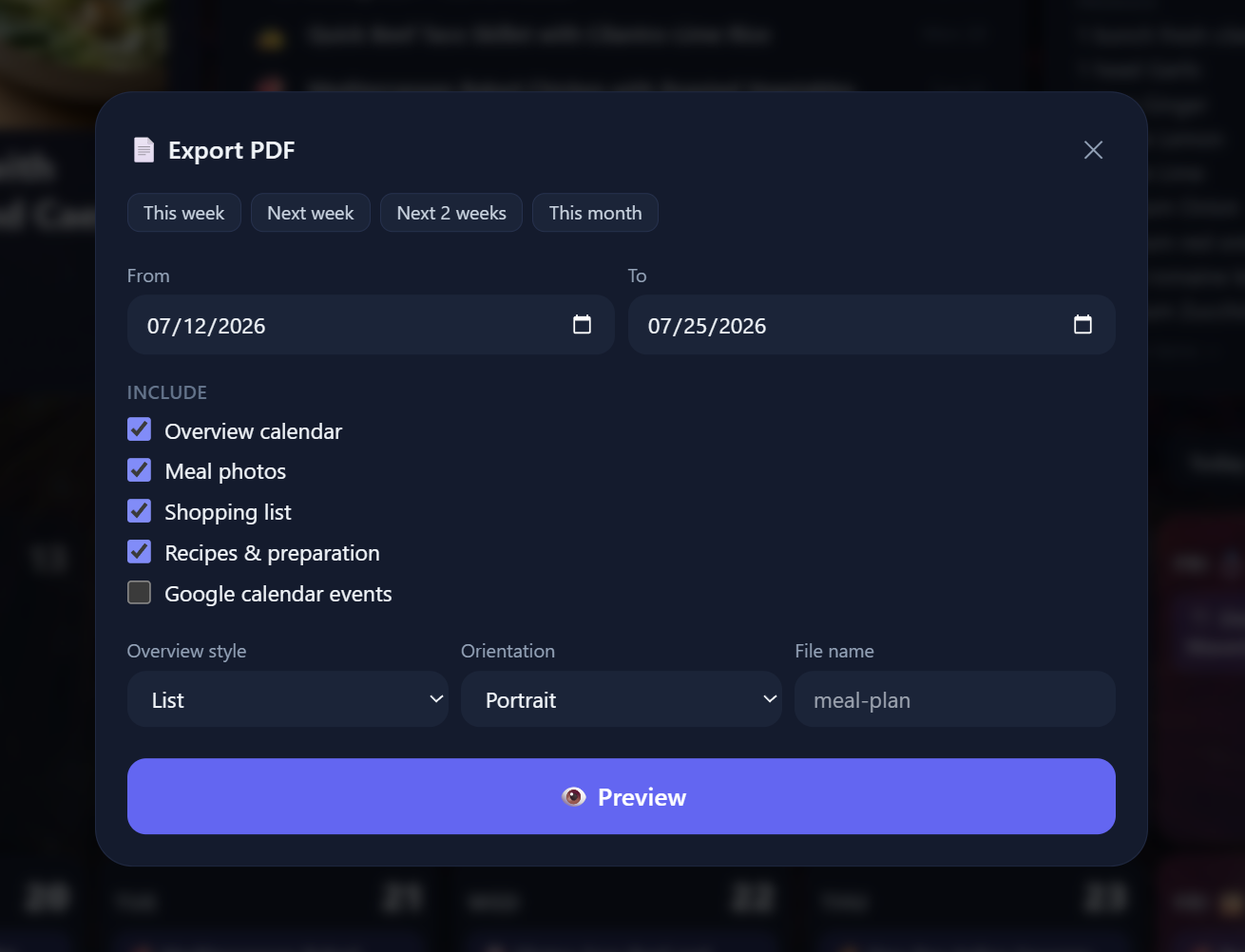
I wanted something physical I could print out. I started with a basic engine that produced sparse, ugly pages, but I switched to WeasyPrint to get real CSS rendering. Now, I get a polished one-page overview or a full grid with photos, recipe cards, and the aisle-grouped shopping list. It looks like a professionally designed meal plan rather than a printout of a website.
System Performance and Output
Engineering War Stories
I've spent years teaching people to audit systems, but building your own kitchen stack is a special kind of humbling experience. My first major defeat was the grocery-integration project. I spent weeks trying to build a bot that would search prices, clip coupons, and populate a digital cart at my local store. I was beaten comprehensively by their bot detection—WebRTC leaks, fingerprinting, and captchas I couldn't bypass. I eventually realized the best integration was the door they'd already left open. I deleted the entire module and switched to a clean multi-format export that lets me copy my list directly into the store's own app. It was a reminder that sometimes the most 'advanced' feature is just a well-formatted text block.
Then there was the time I accidentally destroyed my own data. A careless test-cleanup script did a fuzzy search and wiped out a recipe I actually cared about. I had no way to recover it, which is why the app now triggers a safety snapshot before every restore and runs automatic daily backups. Nothing motivates a backup strategy quite like watching your own work vanish into a terminal window.
I also learned that AI needs firm boundaries. Early on, despite being told 'no fish except shrimp,' the model cheerfully suggested a salmon dish. That incident led to hardening the prompts with strict household rules that are now enforced at the schema level. I also had to solve a frustrating iOS glitch where Safari would auto-zoom whenever I tapped the chat input because the font was under 16px. It left the page permanently panned until I forced a 16px minimum for all mobile inputs. It's a small detail, but when you're standing at a stove with messy hands, you don't want to be pinching and zooming just to ask the chef a question.
Nothing motivates a backup system like destroying something you actually care about.— Stephen M. Yoss, CPA
The Daily Driver
Yossio Meals isn't a prototype or a weekend experiment anymore. It's live, hosted on my own hardware at home, and sits behind a Cloudflare Tunnel with Authentik OIDC handling the single sign-on. My family uses it every day. The core loop—planning, reviewing the AI's drafts, syncing to Google Calendar, and using the 'Ask the Chef' chat while standing at the stove—is fully operational and backed by a green suite of Playwright tests to keep me from breaking it. Even the Amazon SES integration is verified and sending real itineraries to our inboxes.
The mobile experience was the final hurdle. I had to rework the cook mode into a tabbed interface to keep the keyboard from hijacking the screen every time I asked a question about substitutions. Now that those friction points are gone, the system actually does the job I built it for: it removes the mental load of the 5 p.m. decision. I don't have to wonder if I have the ingredients or if we have time to cook; the system already checked the calendar and the pantry before it ever showed me a suggestion.
The Roadmap for Version 2.0
The system is stable, but there are a few architectural refinements I'm planning to handle the 'what if' scenarios of a self-hosted app.
Current System Health
The Blueprint for a Working Kitchen Bot
- Separation of Concerns: Use AI for the creative heavy lifting—like meal ideas and recipe tweaks—but let deterministic code handle the logic, math, and data validation.
- Boring Tech Wins: You don't need a complex SPA. Python, HTMX, and SQLite provide a stable, fast experience that's easier to maintain and host at home.
- Respect the Calendar: A meal plan that doesn't know you're at soccer practice until 7 p.m. is a plan you won't follow. Integration with your real schedule is the only way to beat decision fatigue.
- Fail Gracefully: When complex integrations like grocery store bots fail, delete the code and find a simpler door, like well-formatted text exports.
Common Questions on Self-Hosted Planning
Why use Mealie and a custom app instead of just Mealie?
Mealie is an excellent recipe manager—the 'pantry' for your data. However, it doesn't solve the decision fatigue of scheduling around a family calendar or synthesizing new ideas based on specific household constraints. Yossio Meals acts as the 'brain' that sits on top of that library.
Doesn't the AI hallucinate ingredients or quantities?
It can, which is why the system never lets the AI do math. The LLM generates the recipe structure, but Python code handles the ingredient scaling and shopping list consolidation. If the AI returns malformed data, the system triggers an automatic repair retry before it ever reaches the user.
How does the 'Ask the Chef' feature work without getting confused?
The chat is context-aware. When you open a meal in Cook Mode, the specific recipe data is fed into the prompt. This allows the model to answer specific questions about substitutions or prep steps based on the actual ingredients and instructions you're looking at.
Stop Fighting the 5 p.m. War
The goal isn't to build the most complex automation possible; it's to build one that actually survives a Tuesday night in a busy kitchen. If you're tired of staring at a half-empty fridge, it's time to stop automating the mess and start building a system that understands how your household actually eats.


